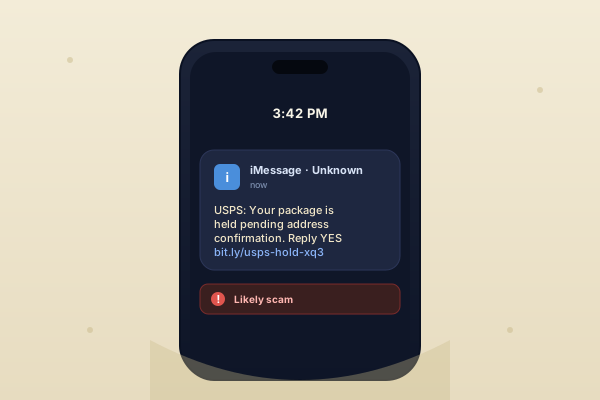
If you've had a kid get a phone in the last two years, you've probably seen the screenshot already. Usually it's USPS or FedEx. Sometimes it's a toll road. Sometimes it's "your bank account has been frozen, click to verify." The domain name is slightly off; the urgency is high; the link goes to something that looks almost right.
This kind of scam — SMS phishing, or "smishing" — isn't new. What's new is the targeting. Several of the parents in our network reported the same thing in 2025: their tween or teen clicked a scam link within seconds of receiving it, often while doing something else (watching a video, on a Discord call, walking down a hallway). Adults hesitate. Teenagers don't. That's the whole play.
Why teens click
A few reasons, in rough order of importance:
- Lower friction. An adult reading a text is usually not in the middle of something else. A teen is always in the middle of something else.
- Text is "safe." Kids learn to distrust email long before they learn to distrust SMS. For most of their life, texts have come from people they know.
- Fear of missing something. "Your package is held" lands very differently when you've been tracking a Shein order for a week.
- The attacks are better. Modern smishing kits use real-looking domains, real logos, real delivery pages. The bar to tell "real" from "fake" is higher than it was three years ago.
The single most useful thing you can teach a kid about text messages: if a text wants you to do something urgently, the correct response is to ignore the text and open the real app.
The two settings that stop most of them
On iPhone
Settings → Messages → Filter Unknown Senders → On. This splits your child's Messages into two tabs: known contacts and everyone else. It does not block the scams — they still arrive — but they arrive in a separate, quieter tab and don't generate a lock-screen notification. That's usually enough to break the "click before thinking" loop.
On Android
In Google Messages: Settings → Spam protection → On. Google flags obvious scams with a warning banner. It's imperfect, but it catches the mass-market campaigns, which is most of the volume.
Have the conversation once, then point to it
We like to frame it like this, out loud, with our own kids: "Any text that wants you to click something right now is a scam until proven otherwise. If it's real, the company will have the same message when you open their app directly. If opening the real app feels like too much effort, that's fine — it's almost certainly not real."
You don't need to have this conversation every month. You do need to have it once, clearly, in a low-stakes moment — not the first time they click something and panic.
If they already clicked
Don't make them feel stupid. Everyone falls for one of these eventually.
- If they entered a password, change it — from a different device — immediately.
- If they entered a credit card, call the card's issuer and report it. Most cards reverse fraudulent charges without questions.
- If they installed anything on the phone from the link, uninstall it. On iOS this is rare; on Android it's the bigger risk.
- Talk about it afterward, not during. "How did that happen? What would you do differently?" — framed as curiosity, not accusation.
The goal here isn't a zero-scam household. It's a household where getting scammed is a thing your kid tells you about, quickly, without shame — because that's the behavior that actually limits the damage.
Last updated 14 April 2026. Spotted something we got wrong? Email us.